Pricing
Free for up to 2 homes, forever. After that you pay per active home per month, with no minimum, and the plan sets the features. Field staff and external links (providers, guests and owners) are never charged, on any plan.
Free up to 2 homes · Essential USD 4 and Professional USD 7 per home per month · 25% off from home 11 · no minimum · unlimited field staff
Prices in US dollars (USD), before taxes.
Work out your price:I manage homesCleaning and maintenance companyHotel with its own staffAnother kind of team
For stores, security rounds, job sites and other teams that run on checklists, there is the Teams plan, per person. See for other teams
Free
To try Keptmarks out, or for a small host with up to 2 properties. Forever, no card.
USD 0
Up to 2 active homes, forever. No card.
2 office users included.
5 GB of files for the whole organization.
- Includes:
- Cleaning: jobs, live progress, room-by-room checklists and approval
- Calendar with Airbnb, Booking and Vrbo reservations via iCal, plus manual reservations
- Maintenance tickets and public links to report a problem
- Phone app for field staff, with a PIN
- Team announcements, with read receipts
- Status of your team’s phones
Essential
For a cleaning, pool or gardening company, or a property manager, that operates every day.
USD 4per home per month
No minimum: you pay only for active homes
5 office users included. Extra office user: USD 6 per month.
20 GB of files for the whole organization. Extra space, if you allow it: USD 2 per month per 10 GB.
- Everything in Free, plus:
- All the homes you have, at USD 4 each (25% off from home 11)
- Location (GPS) at the start and end of each job
- Internal chat for the office and area leads
- Supplies: catalog, stock, requests and purchase orders
- Area leads and a per-role permissions matrix
- Team shifts
- Hours close for payroll
- Client signature at the end of a job
- Gardening
- Pools
- Team to-dos: assign, repeat, checklist and reminders (on Free, personal ones only)
Professional
The one the trial includesFor a growing operation: several providers, owners and rentals.
USD 7per home per month
No minimum: you pay only for active homes
10 office users included. Extra office user: USD 6 per month.
50 GB of files for the whole organization. Extra space, if you allow it: USD 2 per month per 10 GB.
- Everything in Essential, plus:
- Several cleaning companies working at your properties
- Inventory per property and damaged items
- Laundry
- Check-out inspection
- Recurring maintenance
- Assets and equipment, with QR codes and readings
- Incidents
- Staff certifications
- External vendors with a link, no account needed
- Property owner reports in PDF and Excel
- Your own office tables, with formulas, board, calendar and reminders
- Rentals of carts, bikes or equipment, with digital agreements and deliveries
- API, webhooks and integrations with accounting and booking systems
- Photo reading: pool water, receipts and meters read from a photo
- Hotels: room board, daily split and inspection
- Share houses with another company that uses Keptmarks
- Your own dashboards: numbers, charts and tables of the operation, shared by role
- Client billing: statements per client and month, prices, payments, PDF and Excel
Enterprise
From 150 properties or with special needs.
Custom price
Office users agreed with us
Unlimited files
- Everything in Professional, plus:
- Volume price agreed with us
- Priority support, onboarding and a contract
Field staff is never charged
The people who clean, maintain, and look after gardens or pools sign in with a PIN from their phone and are unlimited on every plan, including Free. You pay per home, not per person.
30-day free trial
With everything in the Professional plan and no card to start. If you choose a plan during the trial, you add a payment method and the first charge happens on the day the trial ends; if you cancel before then, nothing is charged. If the trial ends without a plan, nothing is charged: with up to 2 homes you stay on the Free plan, and with more you choose a plan from the app.
On every plan
- Unlimited field staff: they sign in with a PIN on their phone.
- Unlimited external links for providers, guests and owners, with no account.
- Your data is yours: you see it and export it from the app.
- The same system for one home or for more than fifty.
How billing works
- Prices in US dollars (USD), before taxes.
- Pay monthly, or yearly: pay for 10 months and use 12.
- Plans are purchased on this website, by card. Payments are processed by our payment provider, Creem, which acts as merchant of record: it charges you, calculates the taxes and issues the invoice.
- Your subscription renews automatically at the end of each month or year. You can cancel at any time and keep your plan until the end of the period you paid for.
- Field staff and the links for vendors, guests and owners are never charged, on any plan.
By starting the trial or buying a plan you accept the Terms and conditions. What is refunded and how to ask is in the Refund policy.
Compare the plans
What each plan includes. The 30-day trial comes with everything in Professional.
| Feature | Free | Essential | Professional | Enterprise |
|---|---|---|---|---|
| Office users included | 2 | 5 | 10 | Custom |
| File storage | 5 GB | 20 GB | 50 GB | Unlimited |
| Field staff | Unlimited | Unlimited | Unlimited | Unlimited |
| Cleaning: jobs, live progress, room-by-room checklists and approval | ||||
| Calendar with Airbnb, Booking and Vrbo reservations via iCal, plus manual reservations | ||||
| Maintenance tickets and public links to report a problem | ||||
| Phone app for field staff, with a PIN | ||||
| Team announcements, with read receipts | ||||
| Status of your team’s phones | ||||
| Gardening | ||||
| Pools | ||||
| Supplies: catalog, stock, requests and purchase orders | ||||
| Area leads and a per-role permissions matrix | ||||
| Location (GPS) at the start and end of each job | ||||
| Internal chat for the office and area leads | ||||
| Team shifts | ||||
| Hours close for payroll | ||||
| Client signature at the end of a job | ||||
| Team to-dos: assign, repeat, checklist and reminders (on Free, personal ones only) | ||||
| Inventory per property and damaged items | ||||
| Laundry | ||||
| Check-out inspection | ||||
| Recurring maintenance | ||||
| External vendors with a link, no account needed | ||||
| Property owner reports in PDF and Excel | ||||
| Your own office tables, with formulas, board, calendar and reminders | ||||
| Rentals of carts, bikes or equipment, with digital agreements and deliveries | ||||
| API, webhooks and integrations with accounting and booking systems | ||||
| Photo reading: pool water, receipts and meters read from a photo | ||||
| Several cleaning companies working at your properties | ||||
| Assets and equipment, with QR codes and readings | ||||
| Incidents | ||||
| Staff certifications | ||||
| Hotels: room board, daily split and inspection | ||||
| Share houses with another company that uses Keptmarks | ||||
| Your own dashboards: numbers, charts and tables of the operation, shared by role | ||||
| Client billing: statements per client and month, prices, payments, PDF and Excel | ||||
| Priority support |
For other teams (per person)
Teams plan: instructions and checklists for any team
For stores, security rounds, job sites, maintenance, inspections and events: the supervisor sends the task with its steps, the person does it on their phone with photos or a signature, and the office sees the progress and the proof. Since there are no properties to count here, you pay for the people who used Keptmarks in the month.
What it solves and for whom
For teams that get instructions from a supervisor and need to leave proof of what they did. Each example comes with its checklist, ready to use or change.
Stores and restaurants
Daily opening and closing, with the cash count, temperatures and a photo of the place.
Proof left: The cash count and temperatures on record, a photo of the place, and who opened and closed, and when.
See the example: Stores and restaurantsSecurity rounds
Checkpoints with QR or NFC tags, notes and photos at each point.
Proof left: Who passed each checkpoint and at what time, with notes and photos.
See the example: Security roundsPreventive maintenance
The monthly check of each piece of equipment, with hours of use, photos and spare parts.
Proof left: Every check with its date, hours of use, photos and spare parts.
See the example: Preventive maintenanceConstruction sites
The safety check before starting: PPE, zones, scaffolding and the site lead signature.
Proof left: A photo of the crew in their protective gear and the site lead signature, every day.
See the example: Construction sitesInspections and audits
Quality audits and vehicle inspections, with a score, findings and a signature.
Proof left: The score, the findings with their photos and the signature of whoever receives it.
See the example: Inspections and auditsEvents
From an empty room to a ready event, with photos and the client signature at handover.
Proof left: Photos of the finished room and the client signature at handover.
See the example: Events
How it works, in three steps
1. The supervisor sends the instruction with its checklist
To one person or a whole team, with a due date and time. Each step can ask for a photo, a note, a signature, a number or a yes or no.
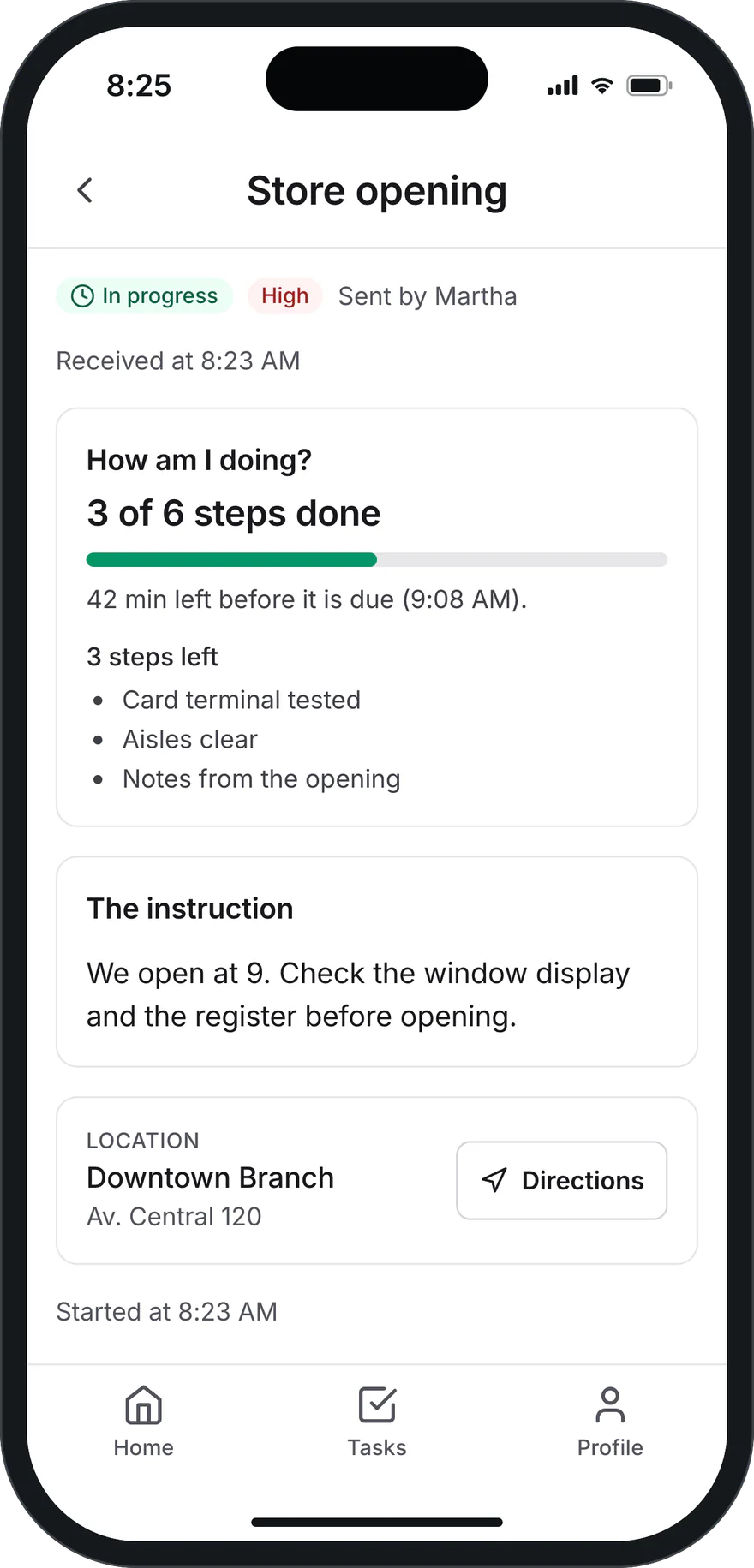
What the person gets: the instruction, who sent it and the steps left. 2. The person does it from their phone
They tap Received (the time is saved) and check off each step with its photo or signature. If they get stuck, they tap I need help and the supervisor gets it right away.
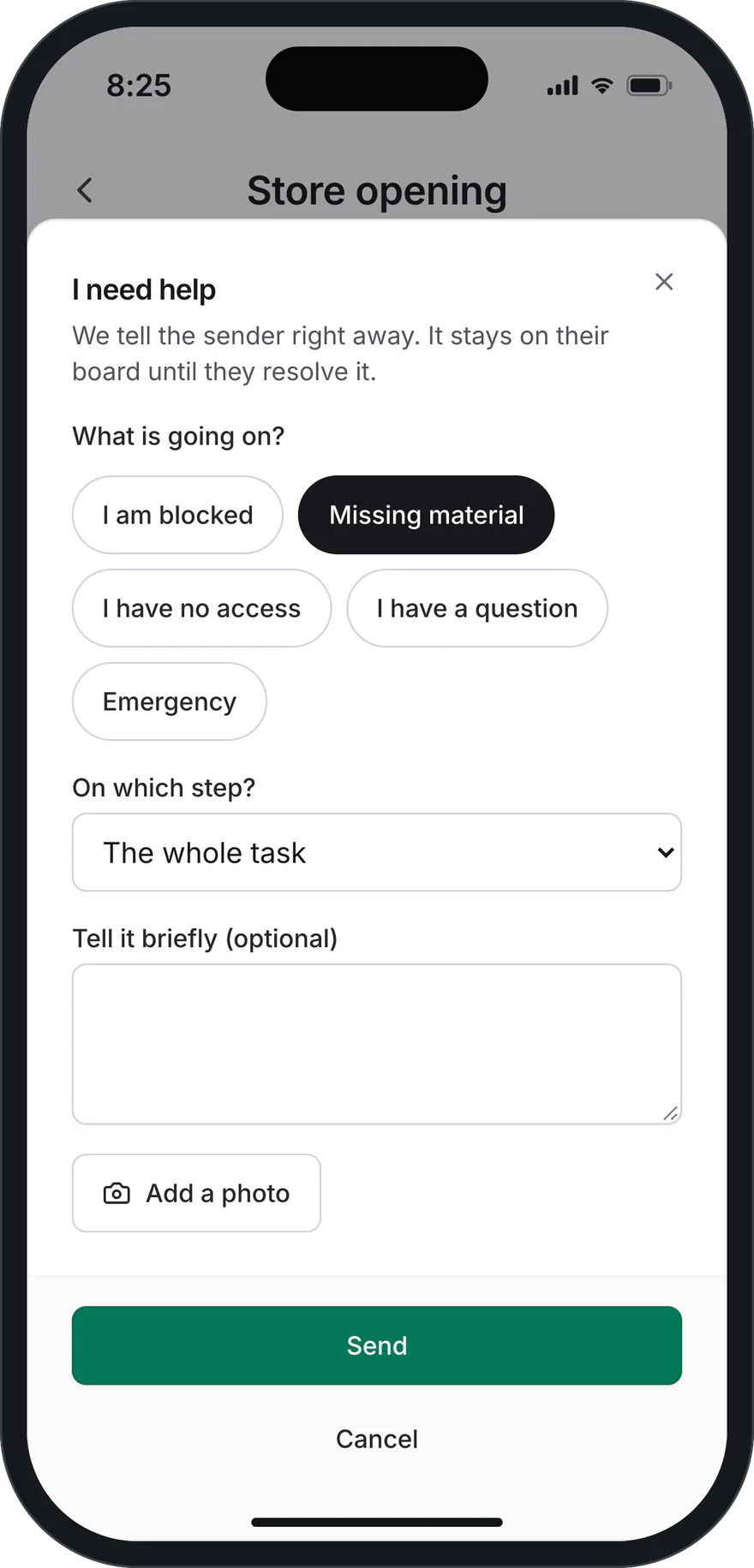
I need help: the reason, a note and a photo. 3. The office sees the progress and the proof
On the live board: who received it, how far along it is, what is overdue and who asked for help. Each step keeps its evidence, who did it and when, and the team report comes out as PDF or Excel.
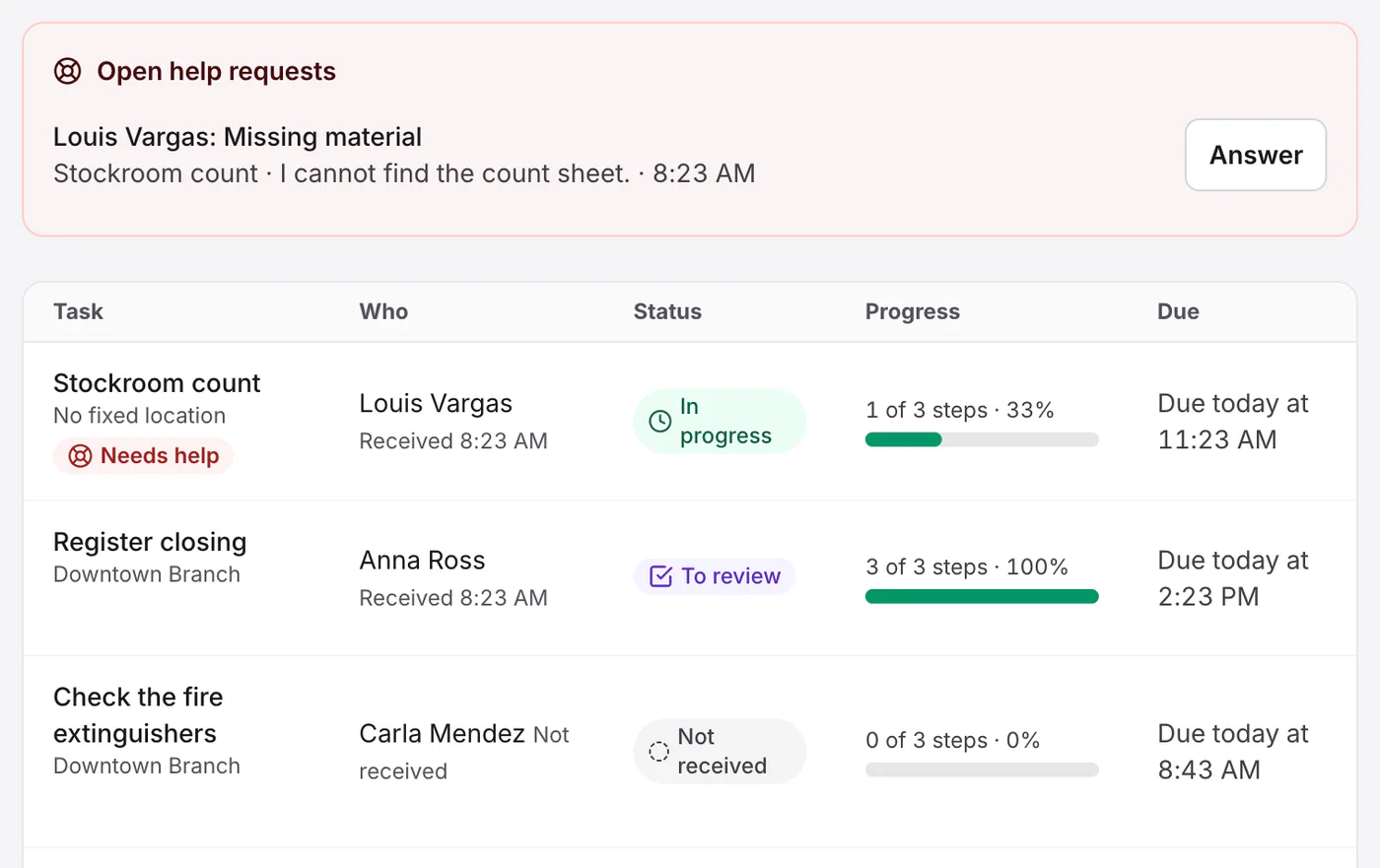
The live board: the help request on top and the progress of each task.


App screenshot with a demo company and demo people.
Why per person: these teams have no properties to count, so the price depends on how many people use Keptmarks in the month. People who did not use it are not billed.
What is included and what it costs
USD 29 per month
- Includes up to 10 active people.
- Each additional active person: USD 3 per month.
- From person 51: USD 2.25 per month (25 % off).
- Free with up to 3 people.
- Yearly: you pay 10 months for 12.
- Everything in the Professional plan: jobs with checklists, check-in and check-out, announcements, shifts, client sign-off, documents, reports and the field app.
What it costs
Active person: someone on the team (office or field) who signed in to Keptmarks or had work assigned in the last 30 days. People who did not use the app are not billed.
- Base, up to 10 people
- USD 29
- 15 people at USD 3
- USD 45
TotalUSD 74 per month
For hotels (per room)
Hotels plan: the room board and the housekeepers’ day
For hotels with housekeepers, a housekeeping manager and a front desk: the live room board, the daily split, inspection and the arrivals and departures list. A hotel is one place with many rooms, so you pay per room.
Why per room
Per property, a 60-room hotel would pay the same as a single house (USD 4 per month). Per room, the price follows the size of the hotel, which is how the hotel already counts its work.
What is included and what it costs
USD 1.50 per room per month.
- Minimum USD 39 per month.
- From room 101: USD 1.125 per month each (25 % off).
- Yearly: you pay 10 months for 12.
- Everything in the Professional plan: room board, daily split, checklists by service type, inspection, reports, the housekeepers’ app and integrations.
Every room set up in Keptmarks counts, including out-of-order rooms. Field staff are never billed.
What it costs
Every room set up in Keptmarks counts, including out-of-order rooms. Field staff are never billed.
- 60 rooms at USD 1.50
- USD 90
TotalUSD 90 per month
Cleaning and maintenance companies (no property management)
For a company that doesn’t manage properties: it cleans, maintains, or looks after gardens or pools in other people’s homes, hotels or offices. Same plans and prices: you pay for what you manage in your own account.
What you pay for
- Each of your clients’ sites that you add to your own account, at your plan’s per-home price, with the same discount from site 11.
- A hotel, a building or a large commercial site counts by the rooms or areas your company services, not by all the ones it has (see the table). If you only look after the pool and the garden of an 80-room hotel, you service 1 or 2 areas: it counts as 1 site.
- Office users above the ones included in your plan, like any other company.
What you don’t pay for
- Homes shared with you by another Keptmarks company, for example a property manager that hires you for cleaning: the owning company pays for them, they are already on its plan.
- Field staff, however many you have.
- Your client portal: clients come in to see their jobs and request things at no cost, and they don’t count as office users.
How a large site counts
| Rooms or areas | Counts as |
|---|---|
| Up to 10 | 1 site |
| 11 to 30 | 2 sites |
| 31 to 60 | 3 sites |
| Over 60 | 3 sites + 1 more for every 30 |
A house, an apartment or a small office counts as 1. You enter the size on the site’s page.
An example
A cleaning and maintenance company on the Professional plan:
- 40 homes shared by a property manager
- not billed
- 15 of its clients’ own homes
- 15 sites
- One hotel with 50 rooms
- 3 sites
- Total: 18 sites on Professional
- 10 × USD 7 + 8 × USD 5.25 = USD 112 per month
The owning company, which already has them in its account and on its plan. In yours they add nothing: not to the price and not to the 2-home limit of the Free plan. A cleaning company that only services shared homes can stay on Free.
No. Your clients come in to see their jobs and request things at no cost, and they don’t count as office users. What is billed is your sites and any office users above the ones included.
If you service it for a client, by the rooms or areas your company services, not by all the ones the hotel has: up to 10 is 1 site, 11 to 30 is 2, 31 to 60 is 3, and then 1 more for every 30. If you clean all 50 rooms of a hotel, it counts as 3 sites. If you only look after the pool and the garden of an 80-room hotel, you service 1 or 2 areas: it counts as 1 site. A hotel that uses Keptmarks for its own team doesn’t count this way: the rule is for the company that services it.
Work out your price
Pick what kind of company you are, how much you look after and what work you do. It is the same calculation billing uses.
Essential: USD 46 per month, USD 460 per year
Your price · Essential
Paying monthly
USD 46per month
Paying yearly
USD 460per year
You pay 10 months and use 12: you save 2 months, USD 92.
How it adds up, per month
- 10 homes at USD 4
- USD 40
- 2 homes at USD 3 (25% off)
- USD 6
- Monthly total
- USD 46
Essential includes 5 office users; each extra one is USD 6 per month.
You try it for 30 days with every Professional feature, with no card. If you pick a plan during the trial, the first charge is on the day it ends.
Prices in US dollars (USD), before tax. It is the same calculation billing uses. The monthly total is charged in whole dollars, rounded down in your favor.
Extra space (optional, on Essential and Professional): USD 2 per month for each started 10 GB above what is included, only if the administration allows it and with the cap it chooses. Unless it is allowed, it is never charged.
Volume discount
A single bracket, like income tax: the first 10 homes at list price and from the 11th on, every home at a discount. Adding a home never makes the earlier ones more expensive.
| Homes | Essential | Professional |
|---|---|---|
| 1 to 10List price | USD 4 | USD 7 |
| 11 and up25% off | USD 3 | USD 5.25 |
Annual billing: pay for 10 months, use 12.
How to start the trial
Register your company and start using it the same day, with your real properties and team, one home or many. The free trial lasts 30 days, includes everything in the Professional plan and requires no credit card.
1.Register your company
What your company does, which jobs you do and who assigns them, then the name, time zone and who manages the account. It takes a few minutes.
2.Add your homes
In the app, one at a time or several at once: how many bedrooms and bathrooms each one has and whether it has a pool or garden. You can add more homes at any time.
3.Review the templates
The system suggests each job’s list from each home’s rooms. You adjust it if needed.
4.Add your team
Office staff and leads sign in with their email. The field team gets a link by WhatsApp and signs in with a PIN. Outside vendors join with a link, with nothing to install.
5.Connect calendars (optional)
If you rent on Airbnb, Booking, Vrbo or another platform, paste each property’s iCal link and cleanings are scheduled from bookings.
6.Start working
Assign the first jobs and each home’s history starts filling in.
By starting the trial or buying a plan you accept the Terms and conditions. What is refunded and how to ask is in the Refund policy.
Pricing questions
No. They are in US dollars (USD) and before taxes. Depending on your company’s country, VAT or another tax may apply and is added when you are charged.
Each active property in your account: a house, an apartment, a villa or a unit rented separately. Inactive or archived properties are not charged, and neither are homes shared with you by another company. A hotel or building you service for a client counts by size (see Cleaning and maintenance companies).
No, on no plan. The people who clean, maintain, and look after gardens or pools sign in with a PIN and are unlimited. Providers, guests and owners use a link and are not charged either.
Someone who signs in with email and password to manage: admins, sub-admins, supervisors and area leads. Free includes 2, Essential 5 and Professional 10; on paid plans each extra one is USD 6 per month. On Enterprise they are agreed with us.
It lasts 30 days, includes everything in the Professional plan and requires no card. In the app you see how many days are left and choose the plan you want. If you choose it during the trial, the first charge happens on the day the trial ends; if you choose none, nothing is charged.
Cleaning with live progress, calendar with Airbnb, Booking and Vrbo iCal, maintenance, the field app with photos and offline mode, and team announcements, for up to 2 active homes, with 2 office users and unlimited field staff. It does not include location (GPS) at the start and end of a job or internal chat: those come with Essential. It does not expire and needs no card. For a third home you choose Essential or Professional.
No. On Essential and Professional you pay only for active homes: 3 homes on Essential are USD 12 per month.
Yes, for the numbers you enter: it runs the same calculation as billing. After that you are charged for what you have each month (active homes or sites, office users and extra storage if you allow it), and if the total has cents it is never rounded against you. Any tax that applies in your country is added at checkout.
By card, on the web: in Plan & usage you choose the plan and whether to pay monthly or yearly, and you pay on the secure checkout page of our payment provider, Creem, which acts as merchant of record: it charges you, calculates the taxes due in your country and issues the invoice. The charge appears on your card statement under the payment provider’s name. The Enterprise plan is agreed with us.
Yes, whenever you want. You can move from Essential to Professional or back, and cancel with no minimum term on the monthly plan. When you cancel, you keep your plan until the end of the period you already paid for and you are not charged again.
Monthly charges are not refunded; annual charges are refunded pro rata if you ask within 14 days of the charge; billing errors, always. The details are in the Refund policy.