The work at your properties, organized and on record.
Your team checks off every task on their phone, with a photo and the time. The office sees progress live and the history of every home. For property managers and cleaning, maintenance, landscaping and pool companies.
Free for up to 2 homes; beyond that, from USD 4 per active home per month. The 30-day trial includes everything, is free and requires no credit card.
Not a property team? Keptmarks for stores, rounds, job sites and more
Is it for your own home? Use it free with your cleaner, gardener or pool service


Job donePalm House · 12 of 12 tasks
Alert: Villa Mar behind7 of 12 tasks done
Every cleaning, every repair and every visit is recorded: who did it, at what time and with which photo.
For teams in
- Cleaning
- Maintenance
- Landscaping
- Pools
- Works without signal too
From one home to more than fifty, with the same system.
How a job gets recorded
1. At the home
Whoever does the job checks off each task on their phone and takes the photo it asks for. Their name and the time are stored; with signal, the time comes from the server.


2. At the office
Live progress: how far along each of today’s jobs is, and an alert for the ones that did not start on time.
3. Afterwards
The history of every home: each job with its date and status, approved or flagged.

Illustration of the app with demo data.
Create your account and start today: for your company or your home.
You add your homes, the system suggests the task lists and you add your team. The trial includes everything, is free and requires no credit card.
Size does not matter
An owner with one home, a small management company or a company with several teams use the same screens. What changes is how much of each thing you use.
One home
Add the home, accept the suggested template and send the link to whoever cleans it. You see every cleaning with its photos without being there.
Ten homes
Connect your Airbnb, Booking or Vrbo calendars and cleanings are scheduled from bookings. Assign them to your team or to a vendor.
More than fifty
Add the homes in the app’s table, several at once, and each area lead assigns and approves their own work. The office sees the whole day on one screen.
When the operation grows, you do not switch systems
- Homes are added in the app, one at a time or several at once, and you can add more at any time.
- If you already have your homes or your team in a spreadsheet, you can paste or import it: a shortcut, not a requirement.
- Roles by area: cleaning, maintenance, landscaping or pool leads who see, assign and approve only their area.
- Each home gets its templates from its rooms; nobody builds a list per home by hand.
How it works, step by step
From signing up to the first job done. Pick a step to see how it looks in the app.
1.Add your homes
In the app, one at a time or several at once: name, bedrooms, bathrooms and whether it has a pool or garden. Only the name is required and you can add homes whenever you want.
Illustration of the app with demo data. 2.Accept the suggested templates
Keptmarks builds each job’s list from each home’s rooms: one section per bedroom, per bathroom, the pool if there is one. Accept them all or adjust them.
Illustration of the app with demo data. 3.Schedule from bookings
Paste each home’s iCal link from Airbnb, Booking or Vrbo and bookings are checked every hour. You can also create jobs by hand or on a fixed schedule.
Illustration of the app with demo data. 4.The team checks off on the phone
The person signs in with their PIN, follows the list room by room and takes the photo each task asks for from the app. Who checked it and when is recorded.
Illustration of the app with demo data. 5.The office sees progress
Live progress shows today’s jobs, how much is left in each, and warns when something did not start on time. The screen refreshes on its own every few seconds.
Illustration of the app with demo data. 6.Every home keeps its history
What was done, when, by whom and with which photos, plus maintenance repairs. Useful for answering an owner, a guest or an insurer.
Illustration of the app with demo data.
What the app looks like
Screenshots of the app as the office and the field team use it today, with demo data.
The office
The day’s dashboard and notifications: what is waiting on someone and who did not start on time.
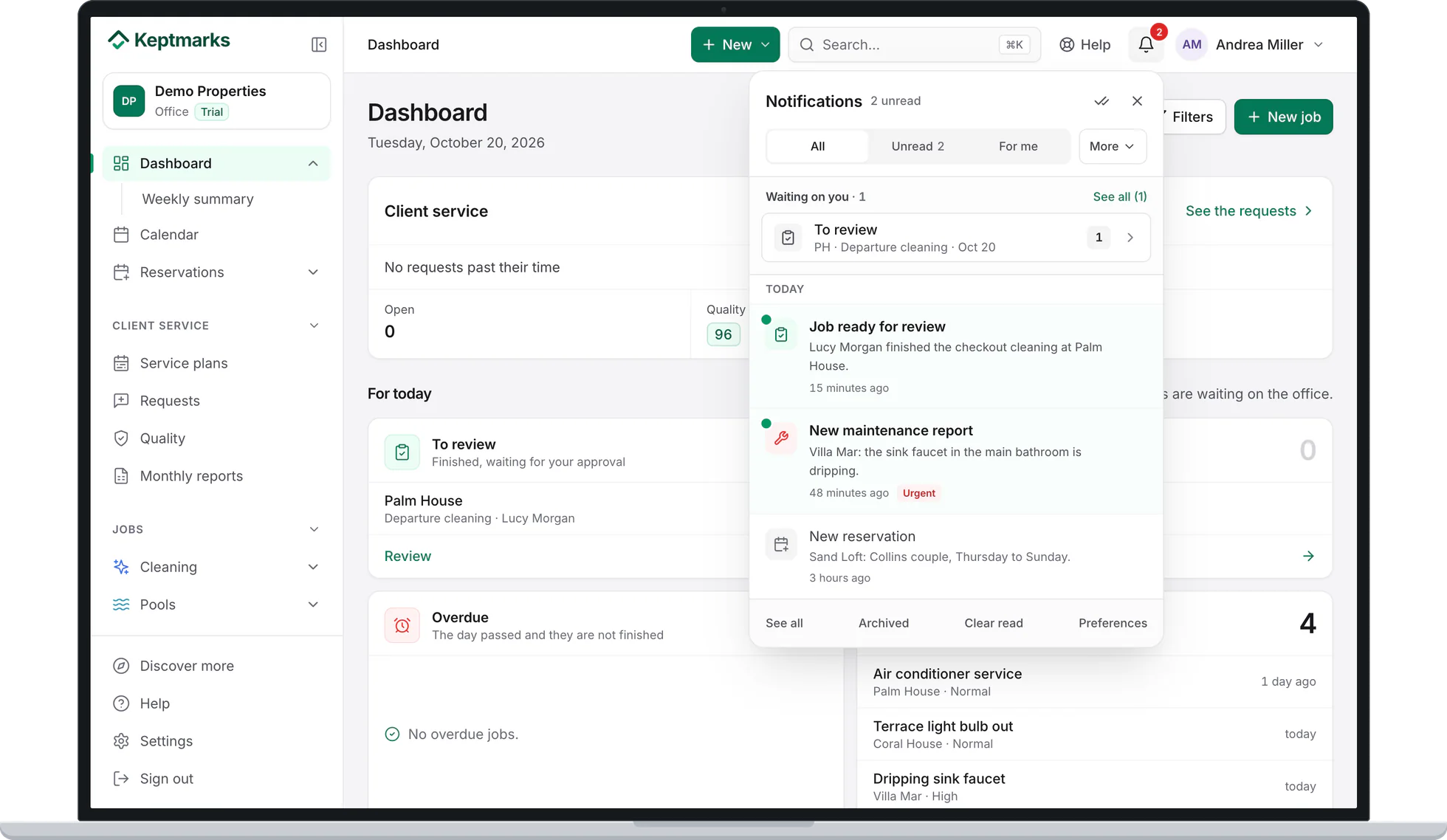
Screenshot of the app with demo data. The field team
On the phone, the day’s jobs with their progress.
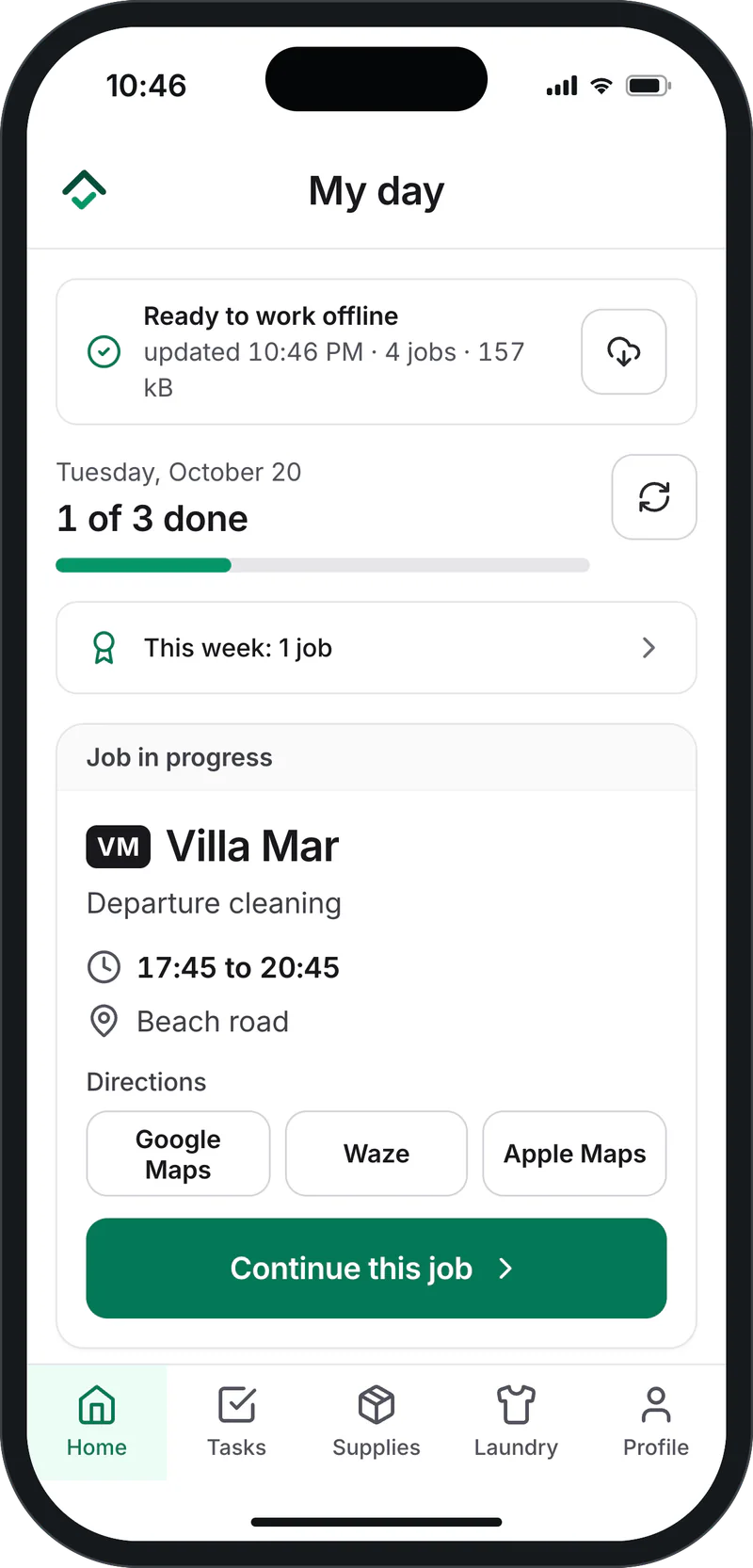
Screenshot of the app with demo data. The jobs
Each cleaning with its time, its home, who does it and what state it is in.
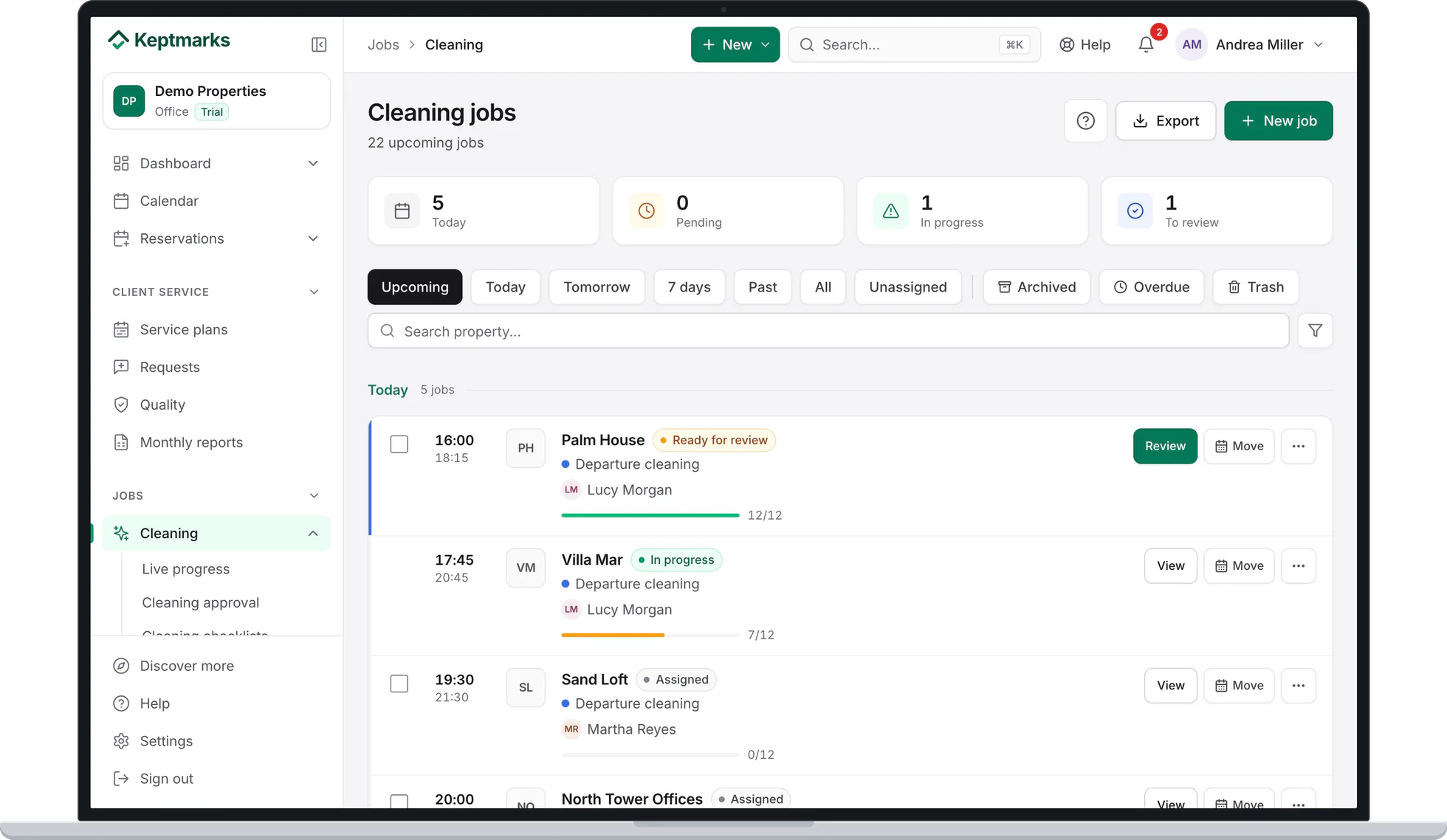
Screenshot of the app with demo data. The task list
Room by room, with the tasks that require a photo and what each one uses.
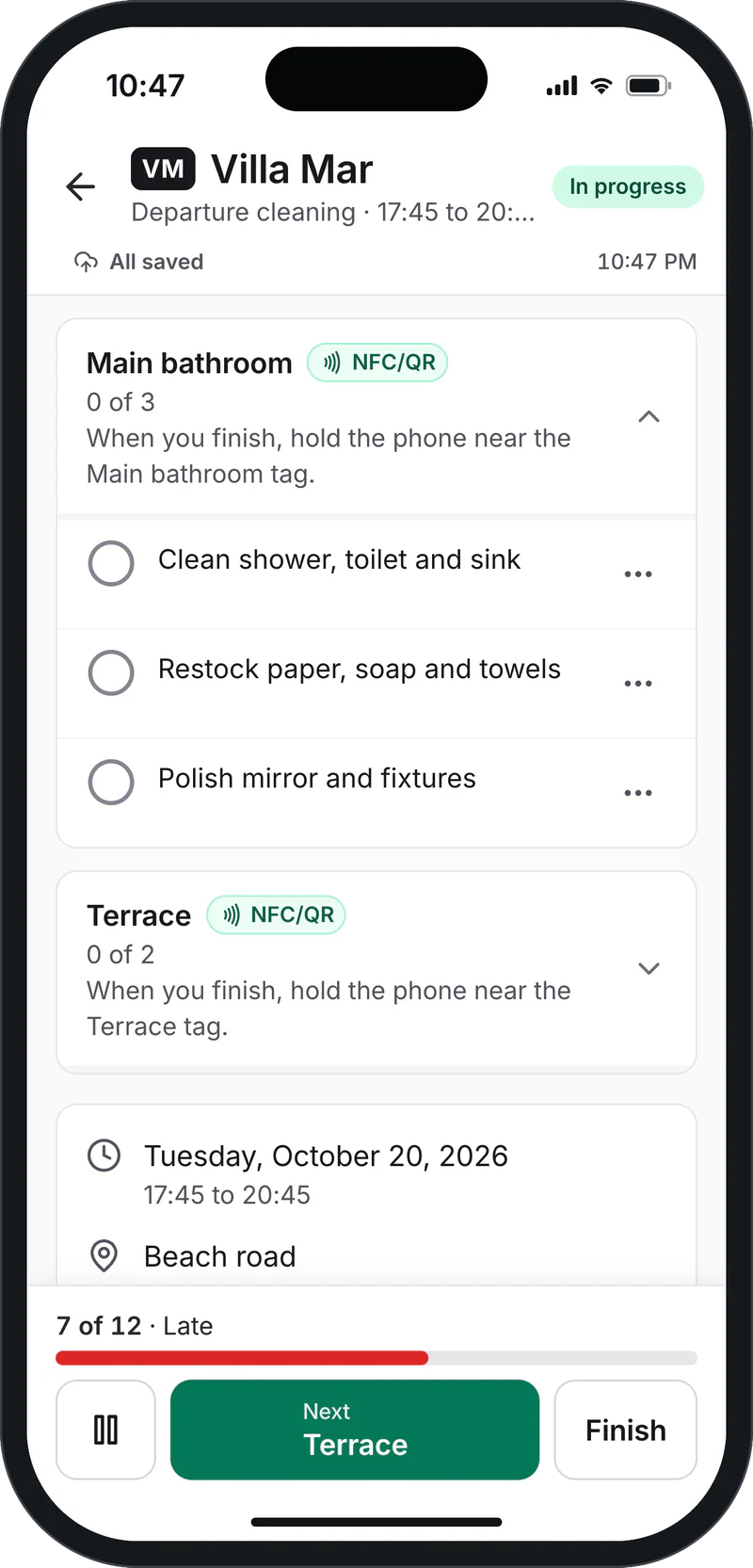
Screenshot of the app with demo data.


What gets recorded for every job
- Who and when
- Every checked task stores the person and the time. With signal, the time comes from the server, not the phone.
- Photos
- Tasks that ask for a photo open the phone camera from the app. The photo stays attached to that task.
- Location
- When the job starts and ends, the phone’s location and its distance from the home are stored. If GPS does not respond, the job continues and is flagged.
- No signal
- If it was checked offline, it is recorded that way, with the phone’s time and the time it reached the server.
The office reviews and approves each job, or flags it if something is not right.
What is included
Everything is included. Each company turns on what it uses and the rest stays out of the menu.
- Cleaning
- Check-outs, check-ins, deep cleans and check-out inspections, with a room-by-room list and photos.
- Maintenance
- Recurring maintenance on a fixed schedule and repair tickets with vendor, quote and log.
- Landscaping
- Garden visits at the homes that have a garden, with their own list and approval.
- Pools
- Chemical readings and pool cleaning, with their own list and approval.
- Inventory
- What is in each home, room by room, and what is damaged or missing.
- Supplies
- Cleaning products and amenities: stock per home, restocking and orders.
- Laundry
- Pickup and delivery of linens and towels, with a record of each run.
- Bookings and calendars
- Bookings from Airbnb, Booking, Vrbo or another platform via iCal, and a calendar with bookings and jobs.
Also: reports you can export to Excel, a per-home maintenance report to print or save as PDF, and phone alerts for whoever needs to decide something.
Outside people, with no accounts and nothing to install
Not everyone who works on a home is on your team. For them there are links: they open in the phone’s browser and do not ask anyone to create an account.
- Outside vendors
- The technician, the pool tech or the contracted company get a link with their job. They see it, accept it and close it with photos, at that home and nothing else.
- Guests
- One link per home, for example in the house manual, to report something broken with a photo. The report arrives pending review.
- Owners
- One link for all their homes, to report a problem. And you can email them the maintenance report for their home.
Every link can be turned off whenever you want and shows how many times it was used.
Working without signal
Many homes have poor signal: at the beach, in the mountains or in a basement. The app keeps checks and photos on the phone and uploads them on its own when the connection returns.
What was done offline is recorded as such, with the phone’s time and the time it arrived. The office does not lose the work or mistake it for work done with signal.
On the phone, with the app or nothing to install
Keptmarks works in the browser on phones and computers. There is also the app for iPhone on the App Store and for Android on Google Play.
Installing it is optional: field staff can open the link you send them and sign in with their PIN.
Download the appWho it is for
- Owners
- One home or several: know what was done at each one without being there.
- Short-term rental managers
- Check-out cleanings, touch-ups and recurring maintenance between guests, coordinated with bookings.
- Cleaning, maintenance, landscaping and pool companies
- A record of every visit to show the client, with photos.
- Condominiums with their own staff
- Recurring maintenance, common areas and repairs with a record for management.
Also for other teams
If your team gets instructions and checklists from a boss or a supervisor, in a store, a construction site, a security round or an event, Keptmarks works too: each task with its steps, its evidence and live progress.
See instructions and checklists for any teamAlso for hotels
Room board, daily split between housekeepers and housekeeping manager inspection.
See how it works in a hotelSecurity and data
- Each company, separate
- All data carries the organization it belongs to and every query is filtered by it. One company does not see another’s data.
- Private photos
- Photos are kept in private storage, in each organization’s folder. They are shown through a link that expires in one hour.
- Passwords and PINs
- They are stored hashed, never as plain text. After several failed attempts the device is blocked.
- Your data is yours
- You see it and export it from the app. We do not sell data or use it for advertising.
Frequently asked questions
Yes. It is the same system a large company uses: add the home, accept the template and send the link to whoever cleans it. There is no reduced version.
Add them in the app, several at once, and split the work by area, each with its own lead. Each home’s templates are built from its rooms. If you already have your homes in a spreadsheet, you can also paste them.
Up to 2 homes is free, forever, on the Free plan. Paid plans are per active home per month, from the first one: USD 4 per home on Essential and USD 7 on Professional, no minimum and 25% off from the 11th home. Field staff are free. Prices in US dollars, before taxes; details on the Pricing page.
30 days, with everything in the Professional plan and no card. If you have not chosen a plan when it ends, nothing is charged.
No. It works in the browser on phones and computers, and on the phone it can be added to the home screen.
Work continues. Checks and photos stay on the phone and upload on their own when the connection returns. It is recorded that they were done offline.
Yes, with the iCal link each platform gives for each home. Keptmarks reads bookings every hour and schedules the cleanings. It does not need your username or password on those platforms.
No. They use a link that opens in the browser. They see only what concerns them and the link can be turned off.
The people in your organization, according to their role. Each company’s data is kept apart from the others and photos are kept in private storage.
Yes. Reports export to Excel and each home’s maintenance report can be printed or saved as PDF.
Try Keptmarks with your homes
Register your company, add your homes, one or many, and start. Free during the trial, no credit card.